A community manager is the person who runs the conversation around a brand on social media and in its owned communities, replying to comments and DMs, moderating discussions, surfacing sentiment back to the team, and turning casual followers into regulars over months and years.
What is a community manager?
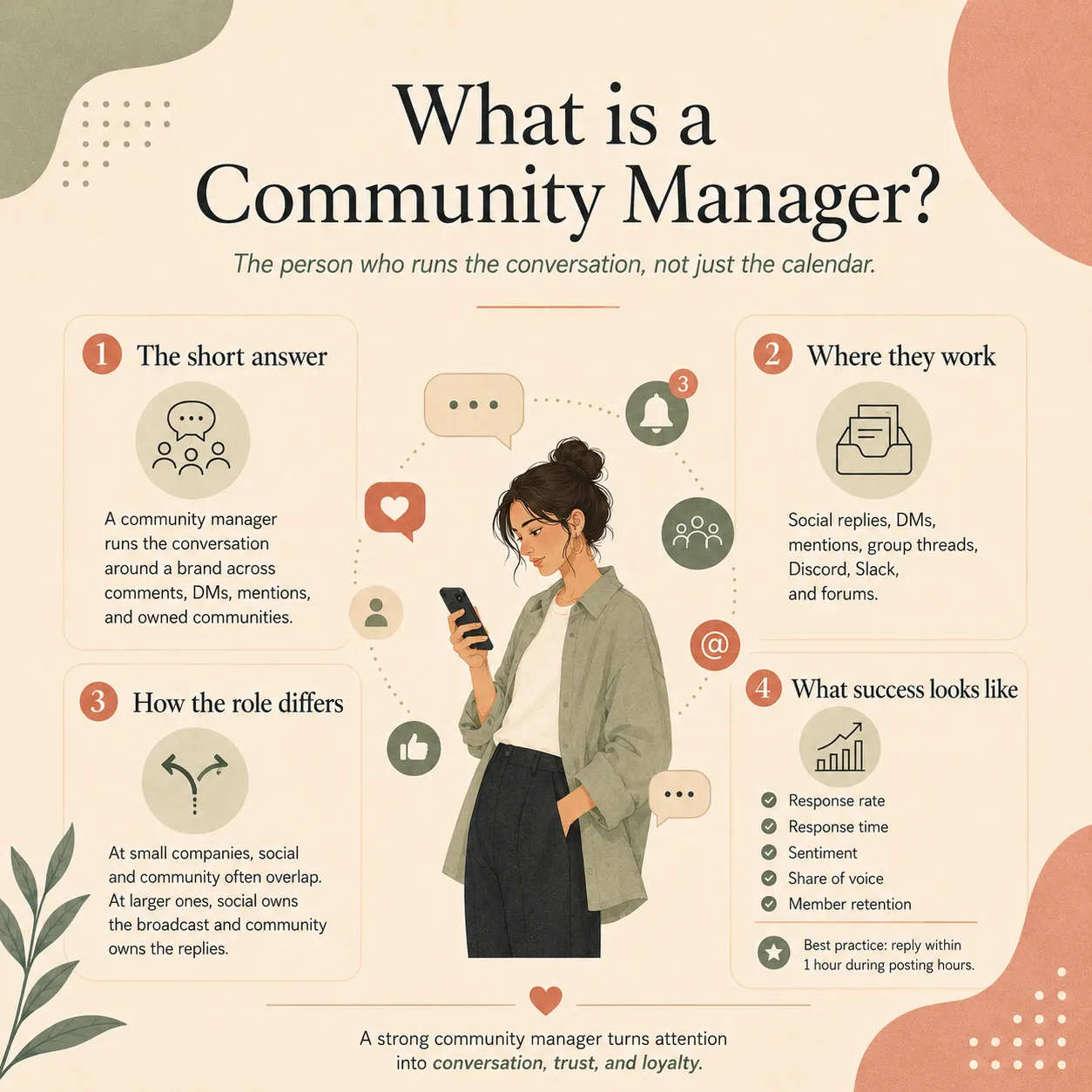
A community manager is the person inside a brand whose job is the conversation, not the content calendar. They live in the comments, the DMs, the mentions, and whatever owned space the brand runs around the edges of social media: a Discord server, a Slack community, a Facebook group, a forum. The work is one-to-one and one-to-few rather than one-to-many, and the success of it shows up in the second and third visit from the same person rather than in the reach number on the first.
The role goes by two slightly different shapes depending on where you are looking. On the social-media side, a community manager is the public face of the brand inside replies and DMs across Instagram, TikTok, X, LinkedIn, YouTube, and Threads. On the wider community side, a community manager runs the home of the community itself: the Discord, the Slack, the customer forum, the gated group on Facebook. In practice most modern community manager job listings cover both, because the same person ends up replying to a customer on Instagram in the morning and welcoming a new member to the Discord in the afternoon.
The Wikipedia entry on online community manager traces the role back to MMORPGs in the mid-1990s and earlier bulletin board systems, and the fingerprints of that origin are still all over the modern job. The work is part host, part moderator, part customer-service rep, part marketer, part early-warning system for the rest of the company when the mood in the comments shifts.
What does a community manager do day to day?
Most of a community manager's day is replies. The work below is what fills a normal week, in roughly the order you would hit it on any given morning.
Clearing the social inbox
Comments under the latest post, DMs across every platform, mentions in stories, saved-for-later messages from yesterday, and the small number of items flagged for the wider team. The first hour or two of the day is almost always this. The work is invisible when it is done well and very obvious when it is not.
Replying to questions and complaints in public
Most replies are short, friendly, and quick. The handful that are not are usually a complaint waiting to escalate, and the community manager is the first person who has the choice of whether to fix it on the spot or hand it to support. The line between social and customer service is doing most of the work here, and a good community manager knows where it is.
Moderating the brand-owned community
If the brand runs a Discord, Slack, Facebook group, or forum, the community manager keeps it alive: welcoming new members, answering early questions, removing the spam, escalating the harder calls, and writing the small group rules everyone forgets about until they get broken. Members feel the absence of moderation faster than they feel the presence of it.
Listening for the unprompted mention
A chunk of every brand conversation happens without an @ mention or a tag, and the community manager runs the listening tool that surfaces it. The find-and-reply work on those mentions is one of the highest-value pieces of the job, because the person who got a reply they were not expecting tends to remember the brand for a long time.
Surfacing what the community is saying
By the end of most weeks the community manager has heard the same complaint, the same feature request, or the same question enough times that the rest of the team needs to know about it. The reporting piece of the job is small in time and large in value: a one-paragraph summary into product, support, or marketing every Friday changes more than a quarterly slide deck.
Helping the social media manager plan the next post
Because the community manager is the closest person to what the audience is actually saying, the content calendar gets better when they sit in the planning room. A weekly nudge of "this question came up nine times, can we make it the next Reel" is one of the most reliable ways to feed real demand back into the calendar.
The pattern across the week is that the loud work is the inbox and the quiet work is the listening, and the second one is what makes the first one matter to the rest of the business.
Community manager vs social media manager
The shortest version is that the social media manager owns what the brand says, and the community manager owns what happens afterwards. Sprout Social puts the split as one-to-many versus peer-to-peer, and that line gets at most of it. Below is the version most teams end up running with once the headcount allows for both roles.
Who owns the strategy
The social media manager. They write the content calendar, choose the platforms the brand shows up on, set the goals, run the analytics, and report on what worked. The community manager has a vote, especially on what topics keep coming up in replies, but the calendar belongs to the social media manager.
Who owns the inbox
The community manager. Comments, DMs, mentions, the saved-for-later folder, and the moderation queue on the brand-owned community all live with this person. At small companies the social media manager covers the inbox too, and that is the first piece of the job that gets handed off when the team grows.
How success is measured
Social media manager success leans on reach, impressions, click-through, and conversion against the calendar. Community manager success leans on response rate, response time, sentiment, repeat-member retention, and the slow-burn growth of share of voice. The metrics overlap on engagement, where both roles share credit for the comment count under a post.
Who is in the room when the brand fumbles
The community manager hits the angry-comment storm first, often before the rest of the team is awake. The social media manager and the broader marketing team get pulled in once the wave is large enough to need a coordinated response. The community manager is also the person who calls the wave when it starts, which is why the role tends to sit closest to the customer-experience team in the org chart.
At a one-person social team, the same person plays both roles and has to context-switch between writing the next post and replying to the last one. At a larger company the split lets the social media manager think two weeks ahead while the community manager handles the conversation today, and both roles get better in the trade.
What skills and tools does a community manager need?
The skill list for the role is short and a bit boring, which is usually a sign that the work is harder than it looks. The community managers who last in the job all have most of the skills below, and the ones who burn out tend to be missing one of them.
Writing fast in the brand voice
Most replies are under thirty words and have to sound like the brand without sounding like a script. A community manager who can hit that bar consistently is more valuable than one who writes long, careful copy slowly, because the inbox will not wait.
Reading the room
Knowing when a thread is fine and when it is about to turn into a pile-on, which DMs deserve a real answer and which are spam dressed up as a question, when a complaint needs an apology and when it needs a fix. Most of this skill comes from spending years inside comment sections of someone else's brand.
Moderation judgement
Where to draw the line on rudeness, when to remove a post versus warn the poster, when to escalate to legal or trust and safety, and how to write a removal message that the person can read without going nuclear. This is the part of the job that takes the longest to learn and the part that breaks a community fastest when it is wrong.
Pattern recognition across the inbox
Spotting that the same complaint has come up four times this week, the same product question has come up nine, and the same feature request has come up thirty. The pattern recognition is what turns the inbox from a treadmill into a feedback loop the rest of the team can act on.
Tooling fluency
A social inbox tool that pulls comments, DMs, and mentions across platforms into one queue (Sprout Social, Hootsuite, Sprinklr, Khoros for the larger end; Buffer, Later, EziBreezy, and the native inboxes for everyone else). A listening tool for unprompted mentions. The platform of the brand-owned community itself: Discord, Slack, Circle, Facebook Groups, or a forum.
Knowing when to log off
The work has no edges. There is always one more comment to reply to, one more DM to clear, one more mention to check. The community managers who stay in the job for years all have a hard line on when the inbox closes for the night, and the ones who burn out usually never set one.
The Hootsuite community manager guide rolls most of these into a five-line list of communication, empathy, problem-solving, moderation, and analytical thinking, which is the same skill set in shorter form.
How fast should a community manager respond?
Inside an hour during posting hours is the bar most brands aim for. Four hours is the practical worst case before the moment is gone, and on a customer-service message a slow reply quietly costs more than a missed reply, because the person who waited four hours and got a template is more annoyed than the person who never heard back at all.
Sprout Social's guide to social media community management is honest about the trade-off: timeliness matters and nobody wants to be left unread for a week, but a fast reply that misses what the person actually said is worse than a slower one that reads the message properly. The right response time is the one the team can actually keep up with consistently.
For brands with a 24/7 audience, a few practical patterns work. Set explicit hours in the bio and the auto-replies so people know when to expect a human. Triage the inbox by message type so urgent customer-service items get answered first and friendly comments can wait. Use a shared inbox so the next shift sees what was answered and what was left open. The brands that get community management wrong are usually the ones promising always-on response times that the actual team is not staffed to deliver.
What KPIs do community managers actually track?
Reach is a social media manager metric, not a community manager one. The numbers below are the ones that actually move when a community manager is doing the job well, and the ones a sensible leader will ask about in a review.
Response rate
The share of inbound messages that got a reply at all. A response rate under 80% on the messages the team has decided to answer is a sign the queue is bigger than the headcount, and pretending otherwise on the dashboard does not help anyone.
Average response time
How long the average inbound message waits before a human reply. Most brands report this as a median rather than an average, because a single weekend can drag the mean across the floor. Track the median, the 90th percentile, and the share answered inside an hour.
Sentiment
The mood of the inbound conversation, usually scored as positive, negative, or neutral by a listening tool. The trend matters more than the absolute number, because sentiment swings hard around launches and outages, and the steady-state direction is what tells you whether the community is warming up or cooling off.
Share of voice
The share of brand-relevant conversation that mentions the brand versus its competitors. Useful as a long-run signal of the community manager's effect on awareness, less useful as a weekly number because it moves slowly.
Net promoter score from active members
Asking the regulars in the brand-owned community whether they would recommend the brand. The score from the regulars is almost always higher than the score from the cold list, and the gap between the two is a clean read on whether the community is doing its job.
Repeat-member retention
The share of community members who come back next month, next quarter, next year. The slowest metric on the list and the most honest one, because repeat attendance is what separates a community from a comment section.
Most teams pick three or four of these and ignore the rest. The Hootsuite community manager job description suggests the same: tie the metrics to the business outcome, and skip the vanity ones that look good on a slide but do not change what the team does next week. For benchmarking the wider field, the Community Roundtable's State of Community Management report has tracked these numbers across hundreds of community teams every year since 2010 and is the closest thing the field has to a longitudinal data set.
What is the salary range for a community manager?
In the US the role pays roughly $55,000 to $90,000 a year for most of the middle of the market, with entry-level seats closer to the high $40s and senior community manager roles at larger tech companies sitting north of $100,000. Aggregator data lines up around the $60k to $80k mark for the median: Built In has the 2026 average around $68,770, Salary.com sits higher at $107,460 for senior-weighted listings, and Payscale puts the range at $36k to $162k once entry-level and senior community lead seats are both included.
Three levers move the number more than anything else. Company size is the biggest, because a Series C tech company pays roughly twice what a small agency does for a similar job. Scope is second, because a community manager who runs both social replies and a brand-owned Discord is closer to a community lead and gets paid that way. Location is third, with US coastal pay running 20% to 30% above the national median and remote roles usually banded by zone. The role does not have a clean Bureau of Labor Statistics line on its own, because BLS bundles it under broader marketing and customer-experience occupations, which is why the number you get back depends on which aggregator asked the question.
Common community manager mistakes
The mistakes below show up almost every time a brand is a year or two into running a real community management function. Most of them are fixable in a quarter once they are named.
- Treating community management as customer service in disguise. The two roles overlap, and a community manager has to handle customer-service conversations, but the job is bigger than ticket triage. Brands that staff community as a cost center end up with reactive replies and no community.
- Promising response times the team cannot keep. A "we reply in under an hour" line in the bio is a contract with the audience, and breaking it costs more than never having written it. Set the expectation the team can actually meet.
- Letting the inbox set the strategy. The loudest customers are not always the most representative ones, and a content calendar that responds to whoever shouted last week ends up looking like a panic. The community manager should pull patterns out of the inbox, not push the loudest one straight onto the calendar.
- Ignoring unprompted mentions. Roughly half of every brand conversation happens without a tag, and the brands that only reply to direct mentions are missing the half that earns the most goodwill. A listening tool plus a daily search routine catches the rest.
- No moderation policy until the first crisis. Writing the rules during the pile-on is too late. A short public set of community rules and a one-page internal moderation playbook saves the day the brand goes viral for the wrong reason.
- Burning the community manager out. One person cannot cover seven platforms, three time zones, a Discord, and a Slack alone. The work expands until the human breaks, and the cost of the break (turnover, lost regulars, dropped relationships) is much larger than the cost of a second hire.
- Reporting reach instead of relationships. A community function judged on impressions will quietly turn into a posting function. Track the slow numbers (response rate, sentiment, retention, share of voice) and accept that they take a year to move.
For a wider read on where the community-manager role sits next to the rest of the social team, the brand awareness and algorithm entries cover the broadcast and ranking side of the work, and the bio entry covers the line where the response-time promise gets written down in public.
Community manager FAQ
What does a community manager actually do all day?
Most of the day is replies. Comments under the latest post, DMs from people who saw a Reel, mentions in stories, the inbox of saved messages flagged for follow-up, and the small number of comments that are about to turn into a complaint if nobody answers in the next hour. The rest of the day is moderation in the gaps where the brand has a Discord, Slack, or Facebook group, plus reporting back to the social media manager on what the community is actually saying.
What is the difference between a community manager and a social media manager?
The social media manager owns the broadcast: strategy, the content calendar, the posts going out, the analytics on what is hitting. The community manager owns the conversation that happens after the post lands: replies, DMs, comments, sentiment, the regulars who keep showing up. At a small company the same person does both jobs. At a bigger one the social media manager runs the strategy and the community manager keeps the inbox and the comments alive.
How fast should a community manager respond?
Inside an hour during posting hours is the practical bar most brands aim for, with a four-hour window as the worst case before the moment is gone. Customer service messages on social skew faster than that on big accounts, where a thirty-minute response is closer to the norm. The honest answer is that speed has to match the size of the team, and a slower reply that actually reads the message beats a fast template every time.
Is a community manager a good career?
Yes for people who like talking to strangers all day and have a stomach for the slow build. The pay sits in the mid-five to mid-six figures range in the US depending on company size, the work compounds because the regulars stay even when the team turns over, and the role is a clean step into broader marketing, customer experience, or product roles later. The downside is that the job is genuinely tiring; a day of replying to angry comments is not the same as a day of writing strategy decks.
What tools do community managers use?
A social inbox tool that pulls every comment and DM across platforms into one queue is the core piece. Sprout Social, Hootsuite, Sprinklr, and Khoros are the bigger ones; smaller teams run on Buffer, Later, EziBreezy, or the native inboxes. On top of that, most community managers run a sentiment or listening tool to track unprompted brand mentions, plus whatever the broader community lives in: Discord, Slack, Circle, Facebook Groups, or a forum.