A character counter is a tool that tallies the number of characters, words, and sometimes lines or paragraphs in a piece of text, used to keep a social media post, bio, ad, or video description inside the platform's character limit before it is published.

What is a character counter?
A character counter is the small piece of writing software that tells you how many characters, words, and lines a piece of text has, and whether the text still fits the platform you are writing for. Some counters live inside a social media composer next to the caption field. Some are stand-alone web tools you paste copy into. The job is the same in both cases. You write, the counter counts, and the limit number ticks down as you go.
The reason character counters exist is that every social network and ad placement has its own ceiling, and the ceilings move around. A LinkedIn feed post is capped at 3,000 characters, a post on X is capped at 280 characters for standard accounts, a Threads post sits at 500, and a YouTube description has up to 5,000. Trying to remember which one is which while writing is slow and easy to get wrong, so a counter does the arithmetic in the background and frees the writer up to think about the line.
Most counters also surface a few softer numbers that matter as much as the hard limit. The cut-off point where Instagram hides the rest of the caption behind the more link. The first 150 characters that show on a YouTube video card. The 125-character preview on most Facebook ad placements. The hard ceiling tells you when the post breaks, the soft cut-off tells you where to put the hook.
Why do character limits matter on social media?
Character limits matter for two reasons that sit on top of each other. The first is mechanical: a post that goes over the limit cannot be published, or gets truncated mid-sentence, or fails to schedule from a third-party tool. The second is editorial: the first slice of every caption is doing most of the work, and knowing where the cut-off is changes how the line is written.
The hard ceiling stops the post
Every platform has a number you cannot go past. On X it is 280 for standard accounts. On Instagram a feed caption is 2,200. On Pinterest a Pin description is 500. Hit the ceiling and the publish button greys out or the API call returns a validation error. A counter is the cheapest way to catch this before it happens.
The soft cut-off shapes the hook
Instagram shows the first 125 characters of a caption before the more link cuts in. LinkedIn shows three to four lines before see more. YouTube shows the first 150 characters of a description on the video card. Knowing those numbers turns the first line from a throwaway into the most important sentence in the post.
Ads have their own preview crops
Meta Ads Manager crops most placements at around 125 characters in the primary text preview, and LinkedIn Campaign Manager has tighter previews again. A counter that mirrors the ad preview crop, not just the back-end limit, saves the writer from a headline that reads as half a sentence.
Schedulers fail loudly when limits are wrong
A third-party scheduler that posts the same caption to Instagram, X, LinkedIn, and Threads at once will reject the whole post if any one variant runs over the platform limit. A counter per platform variant means the whole queue does not break because one line was thirty characters too long.
A character counter is also a small editing forcing function. A caption that has to fit 280 characters reads differently from one that can spread to 2,200, and an LinkedIn bio that has to land in 220 characters reads differently from one that can run a paragraph. Tight limits push the writing to be more specific, which is usually what the audience wanted in the first place.
What are the character limits on each platform?
These are the live ceilings in 2026 for the parts of each platform a counter is usually pointed at. Captions and post bodies first, then bios and short fields where the limits are much tighter.
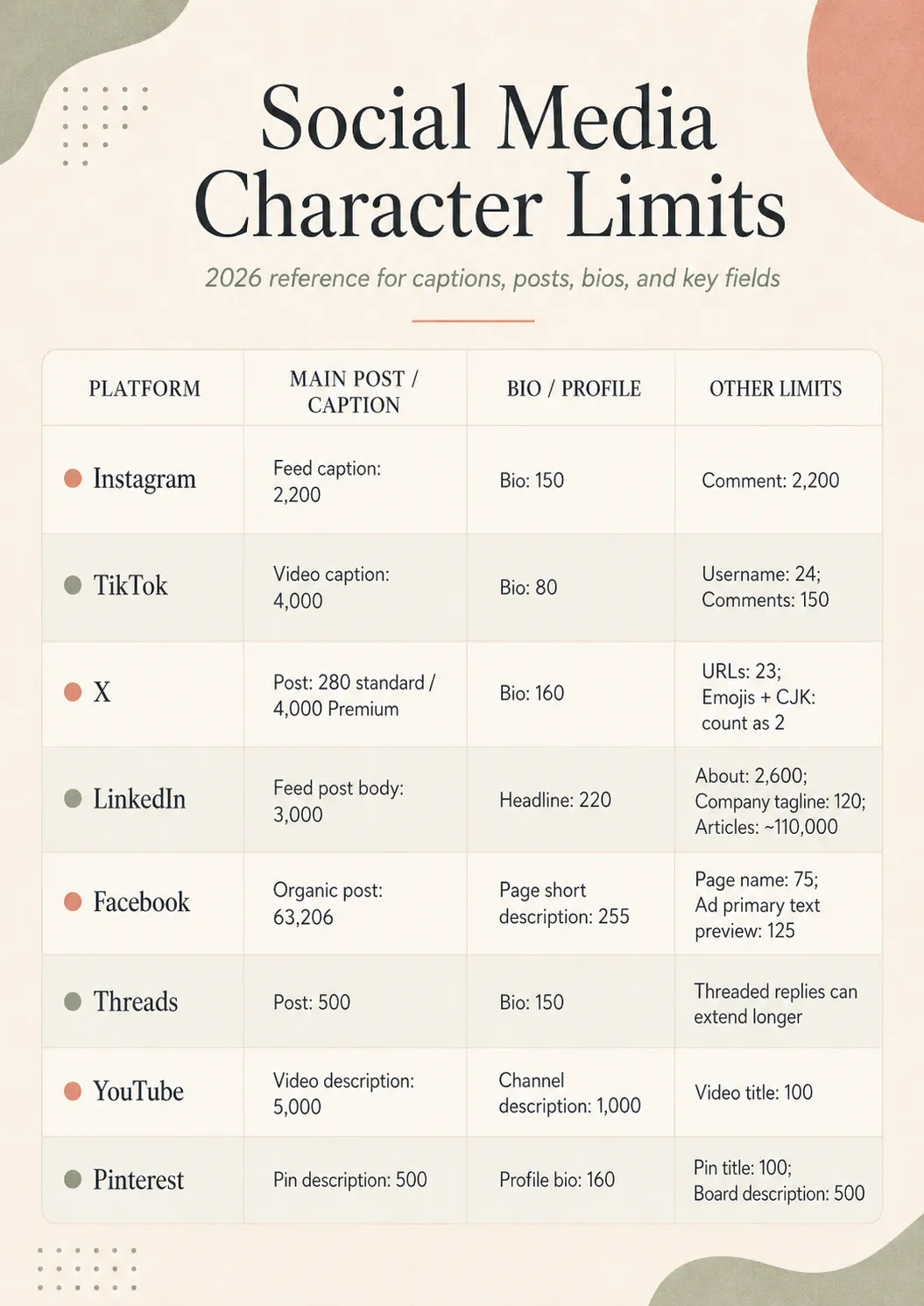
Feed caption: 2,200 characters, with the first 125 visible before the more link. Bio: 150 characters. Comment: 2,200 characters. Up to 30 hashtags counted into the caption ceiling. The same 2,200-character cap applies to Reels captions and to carousel posts.
TikTok
Video caption: 4,000 characters, raised from 2,200 in 2023. Bio: 80 characters. Username: 24 characters. Comments: 150 characters. TikTok also indexes caption text for in-app search, so the front of a longer caption matters for discovery, not only for the reader.
X (formerly Twitter)
Standard accounts post up to 280 characters, with X Premium subscribers able to post up to 4,000 characters and Premium+ higher again. URLs are shortened to a fixed 23 characters by t.co, emojis count as two characters, and CJK characters count as two as well. The exact weighted-character rules live in X's developer docs on counting characters. Bios cap at 160 characters.
Feed post body: 3,000 characters. Headline (the line under the name): 220 characters. About section on a personal profile: 2,600 characters. Company page tagline: 120 characters. Articles published through LinkedIn publishing have a much higher ceiling at around 110,000 characters, so they live in a different world.
Organic post: 63,206 characters, which nobody is ever going to use. Bio (Page short description): 255 characters. Page name: 75 characters. Ad primary text is capped at 125 characters in most preview crops even though the underlying field accepts far more, which is the number that actually matters for paid placements.
Threads
Post: 500 characters, with longer threaded replies that link together. Bio: 150 characters, the same as Instagram. Captions on Threads tend to read more like X than Instagram in rhythm and length.
YouTube
Video title: 100 characters. Video description: 5,000 characters, with the first 150 visible above the fold on the watch page. Channel description (the About tab): 1,000 characters. The full description rules and length are documented in YouTube's help on editing video settings.
Pin title: 100 characters. Pin description: 500 characters. Profile bio: 160 characters. Board description: 500 characters. Pinterest descriptions act like search copy, because they feed both the in-app search and Google indexing for the Pin.
The headline number to remember is that captions and bios live in different worlds. A caption gets thousands of characters on most platforms. A bio gets one or two short lines. A counter that treats both as the same job under-serves the bio, which is the field where a tight character budget bites hardest.
How do character counters handle URLs, emojis, and line breaks?
The interesting part of building a character counter is the weird stuff. The number on the dial is only right if the counter knows what each platform thinks a character is, which is not always the same as what the reader thinks.
URLs
X is the only major platform that automatically shortens every URL to a fixed length, 23 characters, through the t.co wrapper. Paste a 90-character UTM-tagged link into a post and X still counts 23. Everywhere else, the URL counts at its full written length, so a long tracking link can eat a third of the caption before the writer gets to the first word. A counter that does not know this rule will over-count on X and under-count nowhere.
Emojis
Most emojis count as two characters under the hood because they sit on a Unicode surrogate pair. X counts every emoji as two, capped at 140 emojis per post. Instagram, LinkedIn, Threads, and TikTok mostly count them the same way, with composite emojis (skin-tone modifiers, family glyphs, ZWJ sequences) costing four to seven characters depending on how the platform tokenises them. A counter that treats every emoji as one is fine for an estimate, the real number is usually a little higher.
Line breaks
A single line break counts as one character on most platforms (the newline byte). A blank line between paragraphs is two characters. Captions that lean on white space for legibility, especially long-form LinkedIn posts, can lose 30 to 60 characters to formatting on their own. The counter has to count these or the limit comes earlier than expected.
Hashtags and mentions
Hashtags and @mentions both count as plain characters on every platform. Instagram counts hashtags toward the 2,200-character caption limit, X counts them toward 280, and LinkedIn counts them toward 3,000. There is no special handling. A 25-character hashtag is 25 characters of caption gone.
CJK and right-to-left scripts
X counts Chinese, Japanese, and Korean characters as two each, capped at 140. Most other platforms count CJK glyphs as one character per glyph, even though each glyph is technically several bytes under the hood. Right-to-left scripts like Arabic and Hebrew count as one character per visible glyph on every major platform.
Composite Unicode (gender, skin tone, ZWJ)
A single visible emoji like 'family of four' is often four to seven characters under the hood because it is built from several Unicode code points joined with zero-width joiners. Most counters now handle this correctly, the cheap ones still report it as one character. If the count looks suspiciously low on an emoji-heavy post, this is usually why.
The practical test for a counter is the same on every post: write the caption with the emojis, line breaks, and tracking link you actually plan to publish with, and only trust the number on the dial if it matches what the platform reports when you paste the same caption into the native composer. A counter that does not handle URLs, emojis, and line breaks the way the platform does will quietly mislead the writer.
How do you use a character counter well?
Most of the work a counter does is invisible, the few habits worth picking up are quick.
- Write the caption first, count second. Writing to the dial tends to produce captions that are exactly the wrong length, packed with filler near the ceiling or chopped short of the point. Write the line, then check the count.
- Watch the soft cut-off, not only the ceiling. The first 125 characters on Instagram, 150 on YouTube, three to four lines on LinkedIn. The soft cut-off is where the reader decides whether to keep reading, and it earns more careful editing than the last 200 characters of the post.
- Count per platform, not in aggregate. A 600- character LinkedIn caption that fits beautifully on LinkedIn will not fit on Threads or X. If the same post is going to more than one platform, the counter has to show the count for each.
- Include the URL and the hashtags before counting. Counting the caption body and then adding the link and tags at publish time is how posts go over by 30 to 90 characters at the last minute. Paste the link and tags in early.
- Check the count after every edit. Small edits tend to push the post over the limit one character at a time, especially on tight fields like a Pinterest title or an X post. A counter that lives next to the field, not in a separate tab, catches this before publish.
- Leave a small buffer. Writing every caption to the last character makes the post fragile. A tracking parameter added later, an extra emoji in a comment, a one-line autocorrect can put the post over. Ten to twenty characters of slack is cheap insurance.
What mistakes should you avoid with character counters?
The mistakes tend to be small, easy to make, and easy to fix once you have noticed them.
Using one counter for every platform
Pasting a caption into a generic counter and assuming the number applies on Instagram and X equally misses the URL and emoji rules that X applies and the rest do not. The same caption can fit 240 characters on X and 290 on Instagram. The counter has to know which platform the caption is for.
Counting the body and forgetting the link
A 270-character X post written without the link, then padded with a tracking URL at the end, ends up at 293 and the publish fails. Count with the link in place, every time.
Writing to the absolute ceiling
A caption that lands at exactly 2,200 characters on Instagram is a caption that breaks if anything else is added. A small buffer is the cheapest reliability the writer has.
Ignoring bio limits
Bios get a quarter of the writer's attention and a tenth of the character budget. A 200-character bio drafted for LinkedIn cannot drop into Instagram (150) or TikTok (80) without major surgery. The bio entry has the full per-platform table.
Trusting the platform's in-app count blindly
Native composers count slightly differently from third-party tools, especially for emojis and composite Unicode. Most of the time the difference is one or two characters, sometimes it is more. If a post fits in the third-party counter and breaks at publish, this is the usual reason.
Forgetting that line breaks count
Long-form captions with airy formatting can lose 30 to 60 characters to line breaks alone. The counter has to count these. If a draft fits when typed as one paragraph and breaks when formatted, the blank lines are the missing characters.
Treating the cut-off as the limit
The first 125 characters of an Instagram caption are not the caption limit, they are the place the more link cuts in. Writing exactly 125 characters because that is what shows above the fold ignores the part of the caption the algorithm still reads for topic context. The hook lives in the first 125, the topic context lives in the rest, both matter.
A counter that gets all of this right is mostly invisible, which is the point. The writer thinks about the line, the counter thinks about the limit, and the post is the right length without either of them being the centre of attention.
Character counter FAQ
What is the character limit on Instagram?
Instagram captions allow up to 2,200 characters, with only the first 125 visible before the more link cuts in. Bios cap at 150 characters, comments at 2,200, and a Reels caption shares the same 2,200-character ceiling as a feed caption. Hashtags count toward the caption limit, and the maximum number of hashtags per post is thirty, though three to five relevant ones is the working default now.
Does X (Twitter) still have a 280 character limit?
Standard X accounts post up to 280 characters per post. X Premium subscribers can post up to 4,000 characters and Premium+ goes higher again, although replies, quotes, and reposts are still treated as 280-character objects by most accounts and third-party tools. URLs are shortened to a fixed 23 characters by t.co, emojis count as two characters, and so do CJK characters like Chinese, Japanese, and Korean.
Do character counters include spaces?
Yes, by default. A space is a character, and every social platform counts spaces, line breaks, and punctuation toward the caption limit. Most stand-alone counters give you a toggle to exclude spaces if you only want the letter count for an academic word count or a translation quote, but the platforms themselves do not offer that option.
How are emojis counted in a social media character counter?
It depends on the platform. X counts every emoji as two characters, capped at 140 emojis per post. Instagram, TikTok, LinkedIn, Facebook, and Threads count most emojis as one or two characters depending on the underlying Unicode, with composite emojis like family-of-four or skin-tone modifiers sometimes counting as four to seven. A counter that mirrors the platform's own arithmetic is more useful than one that counts every emoji as one.
How are URLs counted by social media character counters?
X is the strict case. Every URL is wrapped by the t.co shortener and counts as 23 characters, no matter how long the original link is. Instagram, TikTok, LinkedIn, Facebook, and Threads count the full URL exactly as you wrote it, so a 90-character UTM-tagged link burns 90 characters from the caption. A good counter shows the URL count for each platform separately, because the same link can take 23 characters on X and 90 elsewhere.