A boosted post is an existing organic social media post that you pay the platform to show to more people, with a small budget, a short run time, and a simpler set of targeting and creative controls than a full ad campaign uses.
What is a boosted post?
A boosted post starts life as an ordinary post. You publish it to your Facebook Page, your Instagram business or creator account, or your LinkedIn Page. Some hours or days later, you decide the post deserves more reach than the feed gave it, so you click Boost, pick an audience, set a budget, and pay the platform to send the same post to more people. The post itself does not change. The distribution does.
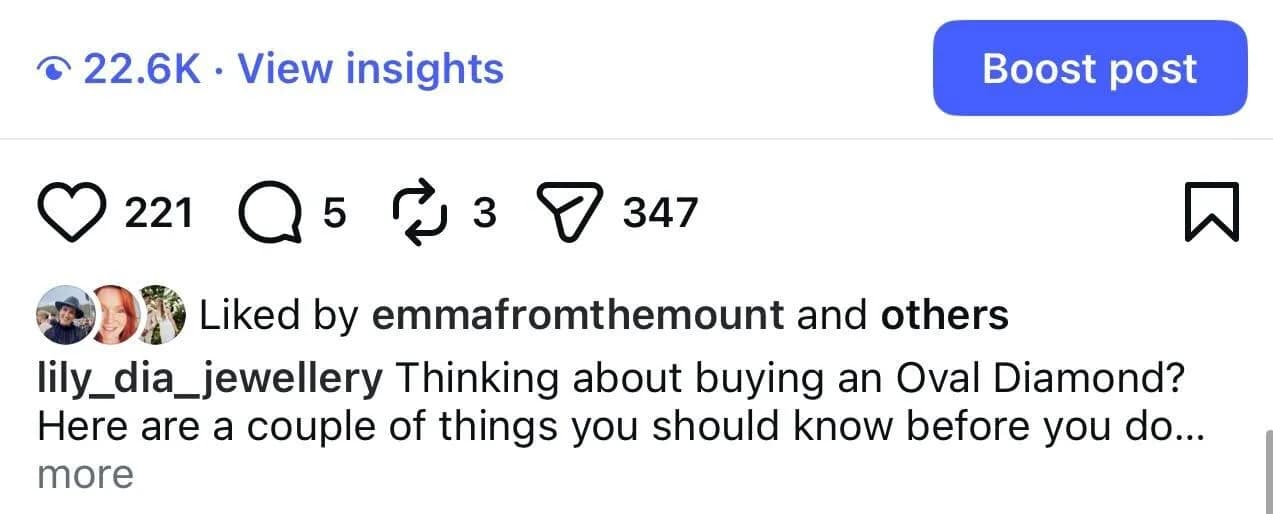
A Facebook boosted post, an Instagram boost post, and a LinkedIn boost post all use the same underlying idea. The differences live in which post types are eligible, the available campaign goals, the targeting options, the visible ad label, and how the result reports back. Underneath, they are all small ad campaigns built on top of organic creative.
Boosting exists because most posts only reach a small slice of the people who already follow the account. A boosted post borrows the platform's paid distribution to put a strong post in front of more relevant viewers, often the ones who do not follow yet. It is the simplest entry into paid social media advertising and the most common first paid step a small business or solo creator takes.
How does boosting a post work?
Once you tap Boost on an eligible post, the platform walks you through a short setup. The exact wording changes across Facebook, Instagram, and LinkedIn, but the steps are familiar.
- Choose a goal. Common options are more engagement, more profile visits, more website clicks, more messages, or more leads. The goal tells the platform what to optimise the spend toward.
- Pick an audience. You can usually use suggested targeting based on your followers, build a custom audience by location, age range, and interests, or upload a saved audience for repeat campaigns.
- Set the budget and duration. Boosted posts use a daily or total budget and run for as little as one day or as long as several weeks.
- Confirm the payment method, review the preview, and submit. The post enters review, then starts running once it is approved.
- Watch the results. The boost reports impressions, reach, interactions, link clicks, profile visits, or leads, depending on the goal you picked.
The auction underneath looks like any other paid social campaign. Your budget competes with everyone else trying to reach the same people, so the cost per result moves with how relevant the post is to the audience, how strong the creative is, and how competitive the auction happens to be on the day.
What is the difference between a boosted post and an ad?
The boost vs ad question is the most common follow-up once someone understands what a boosted post is. The short answer is that a boost is a small, simple ad. The longer answer is that a full ad campaign gives you more controls and is harder to set up.
Where you set it up
A boosted post lives on the post itself or inside Meta Business Suite, the Instagram app, or LinkedIn's page surface. A full ad campaign lives in Ads Manager on Meta or Campaign Manager on LinkedIn.
How many goals you can pick
Boost goals are a curated shortlist (engagement, clicks, messages, leads, profile visits). Ad campaigns expose the full set, including app installs, video views with custom thresholds, store traffic, and catalogue sales.
How precise the targeting can be
Boosting gives you a useful but limited targeting panel. Ads Manager and Campaign Manager add detailed targeting, lookalike audiences, custom audiences from your data, and saved retargeting segments.
How much creative control you have
A boost uses the existing post as the creative. An ad campaign lets you split-test different headlines, copy, calls to action, placements, and audiences, all from the same source.
Where the post can show up
Boosted posts run in the main feed and a small number of placements. Ads Manager unlocks Stories, Reels, Audience Network, Search, and Marketplace placements on Meta, plus Sponsored Messaging and Conversation Ads on LinkedIn.
Who it is built for
Boosting is built for owners, marketers, and creators who want a fast paid push. Full ad campaigns are built for advertisers who need testing, scale, and reporting.
Meta publishes its own writeup on the difference between boosted posts and Meta ads, which is worth a read before any decision that involves more than a few hundred dollars of spend.
How much does it cost to boost a post?
Facebook boost post cost and Instagram boost post cost both start small, which is part of why so many small businesses use boosting as their first paid channel. LinkedIn sits higher because the audience and the auction sit in business spending territory.
Facebook and Instagram
Minimum spend is around one to five US dollars a day depending on currency and country, and most creators and small businesses run boosts in the five to fifty dollars a day range. Cost per result depends heavily on the country, audience, and creative quality.
Minimum daily budgets are higher, often around ten US dollars a day for boosted Page posts. Cost per click and cost per impression also run higher because the audience is B2B.
TikTok Promote
TikTok does not call it boosting, but its Promote feature does the same job for eligible creators and business accounts, with minimum spend that starts around three US dollars a day.
Budget is the easy lever. The harder lever is the post itself. Two boosts with the same five-dollar spend can return very different results because one post earned a real reaction and the other got lukewarm scrolls. Boost the posts already earning saves, shares, and comments, and the spend goes further.
How do you boost a post on Facebook, Instagram, and LinkedIn?
The flow is similar across platforms. The differences are about which accounts are eligible, where the Boost button lives, and which post types you can promote.
How to boost a post on Facebook
From a Facebook Page or Meta Business Suite, open the post and click Boost post, then pick a goal, audience, budget, and duration. Meta's walkthrough is at Boost a post from your Facebook Page.
How to boost an Instagram post
From a business or creator account, open the post and tap Boost, or use the Promotions area of your profile. Reels and feed posts are both eligible. Stories cannot be boosted with the Boost button, though they can be promoted from Ads Manager as a separate campaign.
How to boost a LinkedIn post
Super or content admins on a LinkedIn Page can click the Boost button in the upper-right of an eligible post, then choose an objective, audience template, and budget. Personal posts cannot be boosted through the same flow. LinkedIn's help article covers the eligible post types in detail.
TikTok Promote
On TikTok, the equivalent is Promote, which turns an eligible TikTok video into a paid push toward views, followers, profile visits, or website traffic.
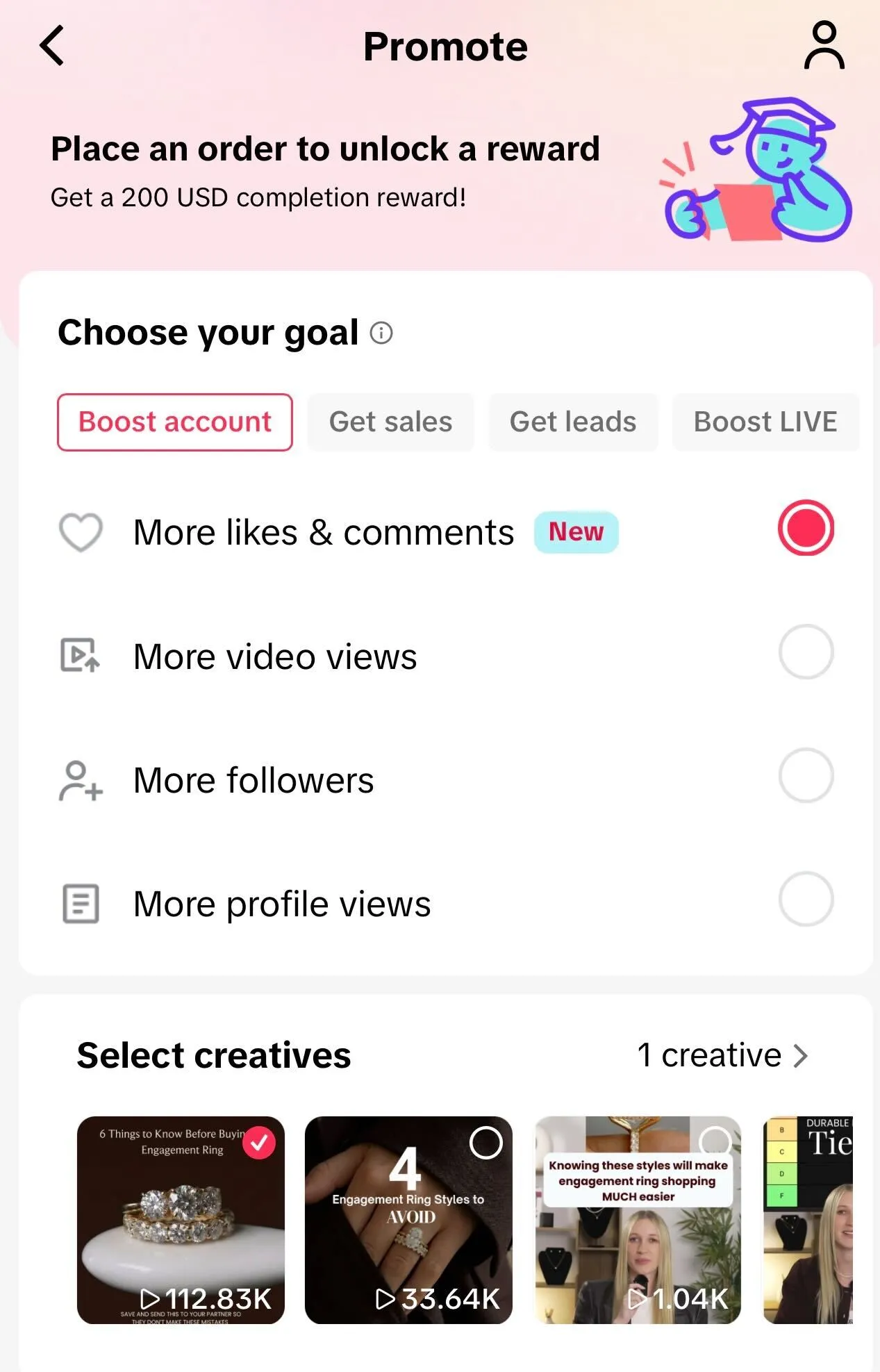
Once a post is boosted, treat the next 24 to 72 hours like the learning phase. The platform spends a portion of the budget to find the right people, so the early cost per result is rarely the same as the final one. Stop and start judgments are easier to make after the post has had at least a day of even pacing.
When should you boost a post, and when should you not?
Boosting works best as a small lever on top of a habit, not as a rescue for a quiet week. A few simple checks tell you whether a post is worth spending on.
Worth boosting
A post already earning saves, shares, comments, or click-throughs at a higher rate than your usual baseline. Boosting a strong post is the cheapest way to add reach to something the audience has already validated.
Worth boosting carefully
A new product launch, an event invitation, or a lead-magnet post. These have clear conversion intent, but the creative needs to match. Boosting a confusing launch post wastes spend faster than any other use case.
Not worth boosting
A weak post with low engagement. Boosting it only buys more impressions for a post the audience has already ignored. Fix the hook first, repost a better version, and boost that one instead.
Avoid boosting
Anything reactive, time-sensitive, or topical that has already run its course. Same logic as not batching reactive content: the moment has moved on.
Pair every boost with a clear question. What does success look like? How many clicks, messages, or follows justifies the spend? A boost without a definition of done is the easiest way to fund a vague feeling that the account is doing something.
What mistakes should you avoid with boosted posts?
Most failed boosts share the same handful of root causes, and the platform will happily charge you whether the campaign was a smart use of money or not.
Boosting a weak post
Spend amplifies what the post is. A clear, useful post gets clearer with paid reach. A confusing one gets shown to more people who scroll past.
Picking the wrong goal
If you boost for engagement when you want website clicks, the platform will deliver engagement. Always pick the goal that matches the business outcome, not the easy-sounding one.
Targeting too broad
A wide audience saves no money if half of them have no interest in the offer. Start narrow, watch the cost per result, then widen if the cost falls and the creative still resonates.
Targeting too narrow
On the other hand, a tiny audience can exhaust quickly and push cost per result up because the platform keeps showing the same post to the same small group.
Stopping too early
Boosts have a learning phase. Killing a campaign on day one is often killing it before the platform has finished testing who responds.
Stopping too late
On the flip side, a boost that has not improved by day three usually will not. Pull the spend and review the creative rather than waiting for a turnaround that rarely comes.
Ignoring the report
The boost finishes, the next post goes out, and nothing is learned. Loop the result into social media analytics so the next boost knows what to repeat and what to drop.
Boosted post FAQ
Does boosting a post actually work?
Yes, in the right circumstances. A boosted post is good at adding paid reach to a post that already earned attention organically. It is poor at fixing a weak post, because spend amplifies what the post is, not what you wished it was. Boost the strong ones, not the silent ones.
Can you boost a post for free?
No. Boosting a post on Facebook, Instagram, or LinkedIn means paying the platform to put it in front of more people. There is no free boost option. The closest free equivalents are organic distribution, repurposing a strong post across formats, and improving the hook before you spend any money.
Can you boost an Instagram Reel?
Yes. Eligible Instagram Reels can be boosted from the Reel itself or from Meta Business Suite, with the same goal and audience options as a feed post boost. Reels with music from the commercial audio library are sometimes eligible; trending or licensed audio often is not.
How long should a boosted post run?
Three to seven days is the most common range for a small boost. That is long enough to let the platform learn who responds and short enough that you can stop spending if the post is not earning the engagement, clicks, or conversions you boosted it for.
Can you boost a post from a personal account?
On Facebook and Instagram, you boost from a business or creator account connected to a Facebook Page. On LinkedIn, only super admins or content admins of a LinkedIn Page can boost. Personal accounts cannot run a paid boost in the standard sense.